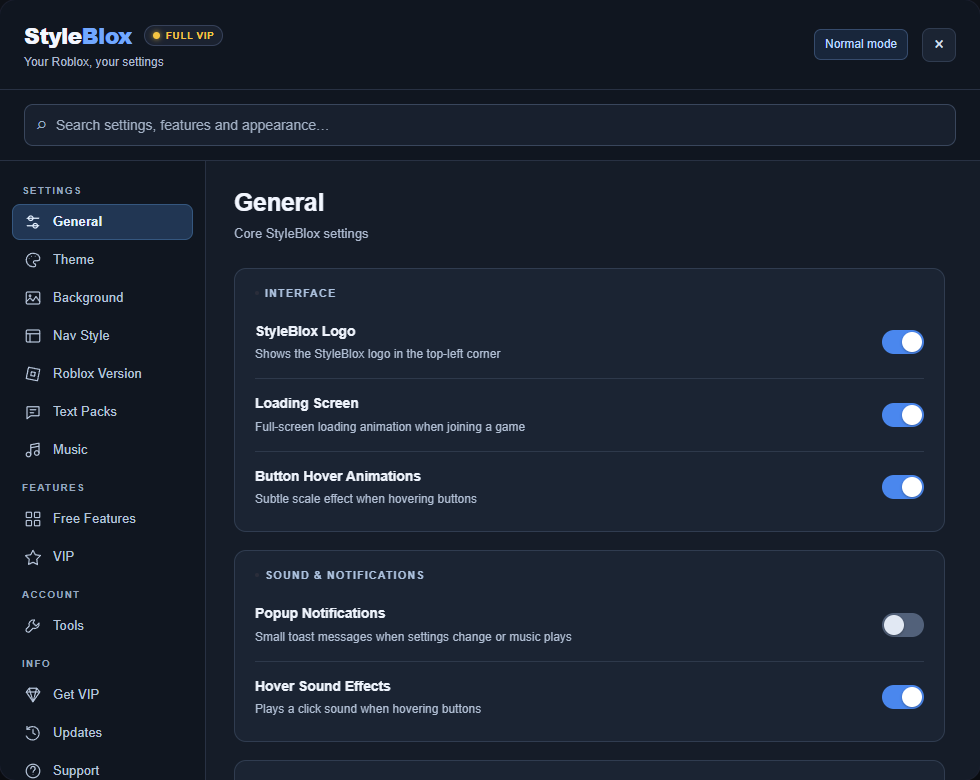
The StyleBlox settings panel. Your appearance and feature controls, in one place.
Make it personal ↗Themes & backgrounds✳Classic Roblox✳Music & playlists✳Your favourite games
EXPLORE STYLEBLOX
See it in action.
See an animated banner on Roblox’s profile layout, alongside the extension’s personalisation options and controls.
Profile banners
The real Roblox profile layout with demo account details and an original animated banner. VIP members can upload images or MP4 videos. Banners appear in Normal mode.
Your banner controls
Choose an image or video, upload a banner, or remove it from the same settings panel.
Backgrounds
Four built-in presets to start with, plus your own images and videos with VIP.
Themes & appearance
Choose a colour theme and customise the details, including your logo text and page tint.
Navigation styles
See the navigation options together and choose how the Roblox top bar and sidebar look.
01 / THE COMPLETE FEATURE LIST
Everything in StyleBlox.
The themes, the music, the game tools and all the useful extras. Every feature is listed below, with exactly what you get for free and what VIP unlocks.
73 features. Explore the full collection.
Free Included with the extensionVIP Unlocked with any VIP plan
Appearance & Themes
Colour theme (Dark Red, Blue, Green, Gold, Cyberpunk)Default and Dark Red are free. Blue, Green, Gold and Cyberpunk require VIP. Classic uses its own colours.Free / VIP
Nav Style (Glass, Solid, Transparent, Tinted, Gradient)Choose a navigation style for the top bar and sidebar. Saved styles return after switching out of Classic.Free
Automatic dark modeNormal mode keeps Roblox dark. Classic uses the 2016 light appearance instead.Free
Accent colour pickerChoose a custom accent for the StyleBlox interface.VIP
Custom logo textReplace the StyleBlox wordmark with your own text in Normal mode.VIP
Dark page tintAdd an extra dark tint for night browsing. Paused in Classic.VIP
Compact sidebarUse icons only in the navigation. Classic provides its own compact sidebar.Free
Focus modeFree
Custom cursorFree
Button hover animationsFree
Hover sound effectsFree
Classic Roblox · 2016A consistent 2016-inspired restyle across Roblox: blue navigation, white panels, classic cards, Friends above Recently Played, purchase dialogs and the web launch prompt. Switch back to restore your Normal-mode choices.Free
StyleBlox logo toggleShow or hide the StyleBlox logo in the top-left corner. Custom logo text requires VIP.Free
Profile & Social
Quick copy username/ID/URLFree
Quick profile statsShow account age, friend count and follower count.Free
Recently visited profilesKeep the last ten profiles for quick access.Free
View custom profile bannersSee banners shared by other StyleBlox users. Banners are hidden in Classic.Free
Right-click profile cardRight-click an avatar for Copy ID, Copy Username and View Profile.VIP
Friend online alertsGet a notification when a watched friend comes online.VIP
Friend activity highlightHighlight friends who are currently in a game.VIP
Custom status textAdd your own status line under your profile username.VIP
Profile banner colour tintTint your profile header. Paused in Classic.VIP
Upload your own profile bannerUse an image or MP4 video up to 30 MB, visible to other StyleBlox users. Hidden in Classic.VIP
Quick-copy chat messagesSave phrases, click to copy, then paste them into chat.VIP
Backgrounds
4 preset backgroundsFour included background images. Paused in Classic; your selection is saved.Free
Upload your own image or videoUse your own image, MP4 or WebM background, saved locally in your browser. Paused in Classic.VIP
Background video volume controlAdjust or mute your custom video background.VIP
Game Tools
Copy game linkCopy a game URL from its game tile.Free
Hide sponsored games/badgesHide sponsored game tiles, or just their sponsored labels, using separate controls.Free
Hide player countsFree
Pin games to sidebarRight-click a game tile to pin it for quick access.VIP
Hide games from your feedRight-click a game tile to hide it. Restore hidden games in Tools.VIP
Game wishlistSave games to a want-to-play list from the right-click menu.VIP
Private game notesSave a private note on a game tile.VIP
Live player-count badgesShow player-count overlays on game tiles.VIP
Utilities & Widgets
Session timerFree
Clock widgetFree
Robux goal trackerFree
Robux real-money value displayShow an approximate value in one of nine currencies, including GBP. Other-currency estimates use fixed rates, not live prices.Free
Welcome message & greeting bannerSet a welcome message and a time-of-day greeting with your avatar.Free
Auto-dismiss popupsAutomatically close Roblox cookie banners, app prompts and survey popups.Free
Daily streak trackerFree
Alt+S keyboard shortcutFree
Search history quick-pickChoose a recent search when you open the search bar.VIP
Custom notification soundsChoose Chime, Pop, Blip, Deep or Retro for Roblox notifications.VIP
Robux confetti burstsShow a confetti burst when your Robux balance goes up.VIP
Roblox Wrapped stats cardView monthly sessions, days active, top game and top text pack.VIP
Minimal greeting styleKeep the avatar and greeting text without the background card.Free
Popup notificationsSmall notifications when settings change or a song plays.Free
Join-game loading screenA StyleBlox loading animation when joining a game. Classic restyles the on-page Roblox launch prompt.Free
Display-only online counterShow a cosmetic online counter. It does not represent real player activity.Free
Display-only Robux balanceShow a custom balance in your own navbar. It does not add Robux or change your real balance.Free
Text Packs
Roadman/UK, AmericanTwo free text packs that rename familiar Roblox words.Free
14 VIP text packsBrainrot, OG Roblox, Pirate, Gamer, Streamer, Rich Flex, Hacker, Clean Pro, Cyberpunk, Military, Medieval, Anime, Football and Aussie.VIP
Music Player
Search and play musicSearch YouTube-powered results and play an available song while browsing Roblox.Free
Resume music after page navigationThe player resumes from your saved position after a short pause while the next Roblox page loads.Free
Optional music videoSongs start in audio view. Use the Video button when you want to see the video.Free
Global Top Artists leaderboardSee aggregate artist rankings from StyleBlox music plays.Free
Recently played tabRevisit songs from your recent music history.Free
Listening history on your profileShare recent plays with other StyleBlox users, or turn sharing off in Music settings.Free
Draggable music playerMove the full player and keep its saved position.Free
Volume boost up to 300%VIP unlocks the range above 100%; normal volume control is free.VIP
Compact mini playerKeep playback controls inside the Roblox sidebar while the full player is closed.Free
Favourite songsSave songs with the heart button and revisit them in Favourites.Free
Custom playlistsCreate, rename and delete playlists; add or remove songs. Playlists are saved in this browser.Free
Automatic next playlist trackMove to the next song when a playlist track finishes, with previous/next controls.Free
Seek through songsClick or drag the progress bar to skip ahead or go back. Keyboard seeking is supported when track duration is available.Free
Tools & Account
Export/import settingsCopy a settings backup and restore it later.Free
Restore hidden gamesMake hidden games visible again. Creating the hidden list requires VIP.Free
Clear game notesClear stored notes. Adding notes requires VIP.Free
Report a bug / contact supportSend a support message from the extension.Free
Reset all settingsFree
Search settingsFind settings and jump straight to the matching category.Free
YOUR LOOK
Set the mood. Change it tomorrow.
Start with a theme. Find your colours, switch up the navigation, or bring your own background. Every setting is a chance to make it personal.
Gift lifetime VIP to someone you know. All VIP features, one £19.99 payment, delivered to their Roblox account.
*Compared with 12 monthly payments. Checkout charges GBP. VIP is linked to the Roblox account used at checkout.
04 / GOOD TO KNOW
A few things you might ask.
Something else on your mind?
Do I need VIP to use StyleBlox?+
No. You can start with the free extension and use music, free text packs, preset backgrounds, navigation styles and a range of everyday tools. VIP adds the premium customisation, game and profile features.
Does Classic mode change the actual games?+
Classic mode restyles the Roblox website with a 2016-inspired look. It doesn’t change Roblox games or restore retired Roblox services. Switching back to Normal brings back your saved visual choices.
What happens to music when I change pages?+
The player runs inside Roblox. Music continues when you minimise the panel, and it resumes after a full page navigation with a short loading pause. Video is optional.
How does VIP activate?+
Use the correct Roblox account at checkout. VIP is linked to that account and checked by the extension. Sign in on this website to see your access and purchase history. Contact us if a completed purchase hasn’t appeared.
Can I cancel a subscription?+
Yes. Open My Account to manage your subscription. Cancelling stops renewal; your access stays active until the end of the paid period. Lifetime and Solana purchases are one-off payments.
Is StyleBlox made by Roblox?+
No. StyleBlox is an independent browser extension. It is not affiliated with, endorsed by, or operated by Roblox Corporation.